

827
likes
36
comments
daily view 0
monthly view 0
Live Analytics
Comments 0
Creative Commons Licenses Explanation Analytics Table
Income Estimates for Creative Commons Licenses Explanation
Based on this YouTube video's total view count of 61.6K views and industry-standard rates, the estimated total earning is $43 - $123 through ad revenue. Historical data is not yet available to calculate daily, weekly, or monthly averages.
About Creative Commons Licenses Explanation
Explore Creative Commons Licenses Explanation with 61,671 views, 827 likes, and 36 comments. Experience the impact of this video content that has captured audience attention.
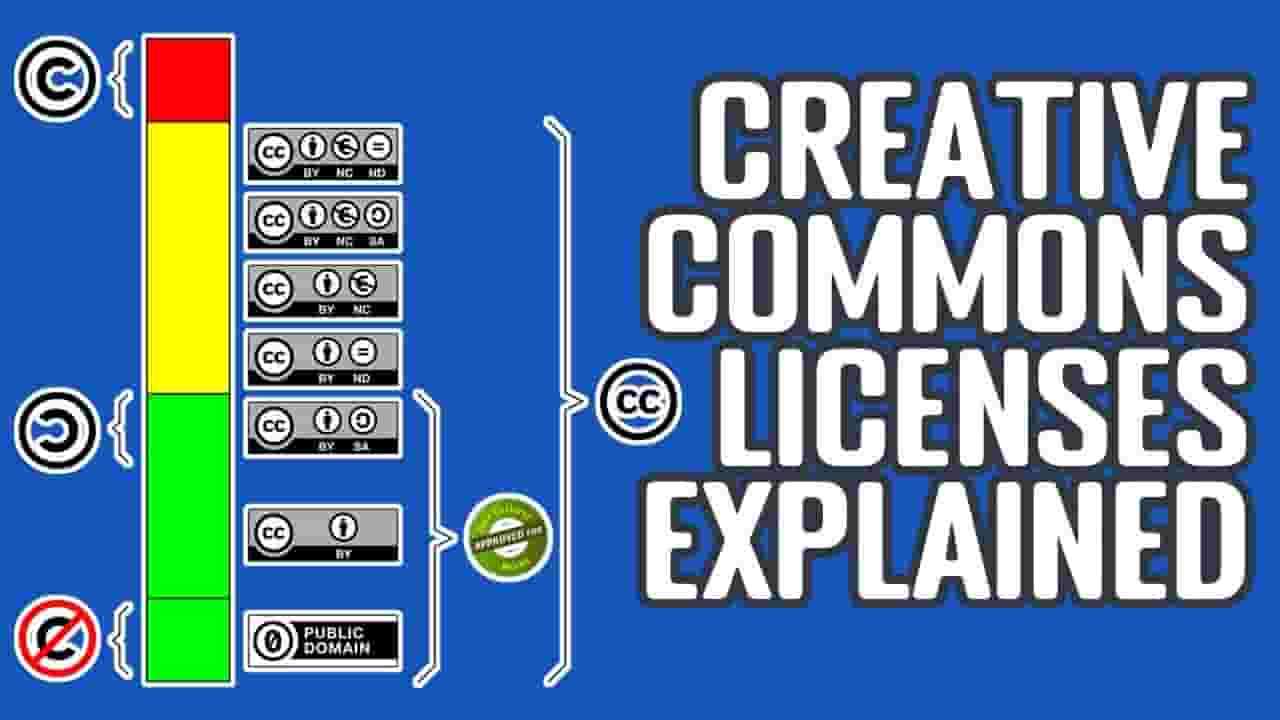
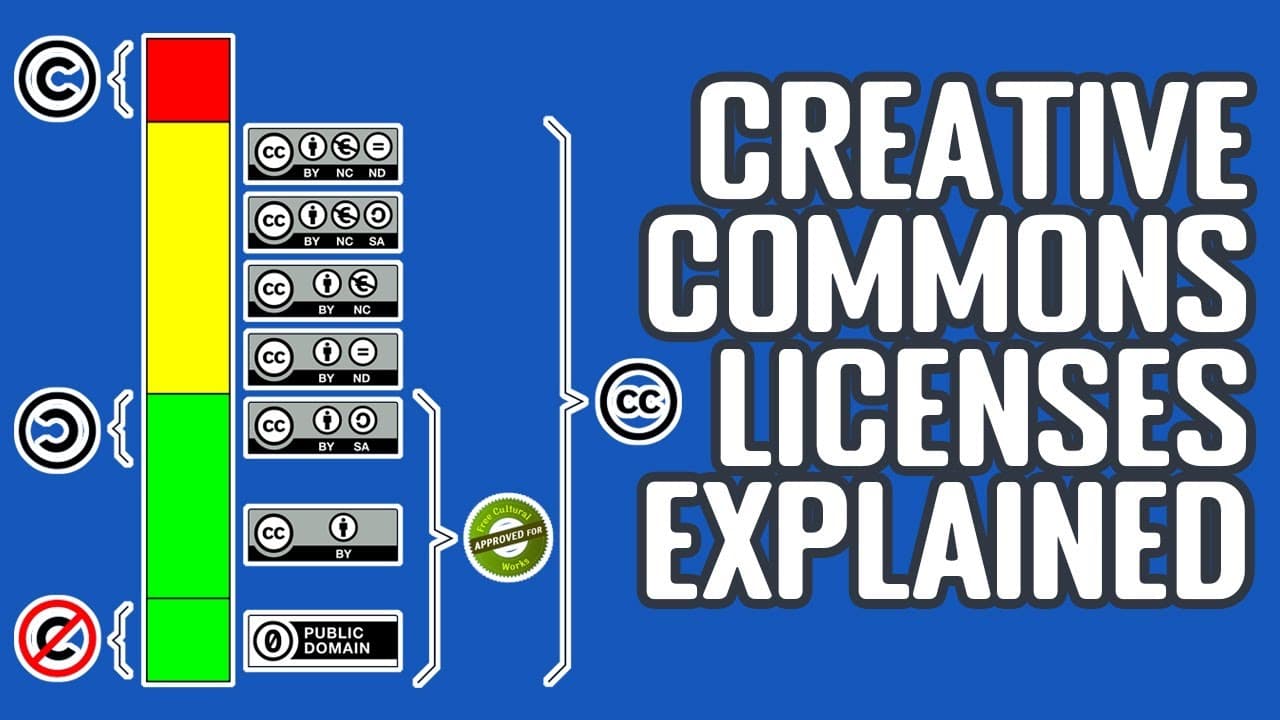
Explanation Of Different Creative Commons Licenses If you are a YouTuber who create online video for your channel, you may realize that it is a time-consuming job to find those royalty free resources for your video, such as free music and sound effects. Creative Common Licenses, which is also called CC licensed, is a type of public copyright licenses that enable free distribution of copyrighted resources free of charge. Creative Common Licenses usually have "CC" icon on the left side of the license tag. The CC licenses all grant some "baseline rights" which indicate what you can achieve. The "Attribution (BY)" right means you can remix or reuse the resource in your work as long as you can give credit to the creator. The usual way to give credit is to provide some type of attribution in video or description by putting some back links to the creator's website. Since creative commons version 2.0, this right will be compulsory and all CC licenses will include this right. The "Share-Alike (SA)" right means you need to attach the the same license to your video as the media creator attached to their work. Without this right, you can offer different licenses for your work from the resource. For example, you are using some music resources which are under CC BY license. You want to share your remixed version but you don't want your work to be used for commercial projects by others. So, if there is Share-Alike right attached in original resource, you can add the Non-commercial condition to your work to change the license to CC BY-NC. The "Non-Commercial" right are the same as the CC BY one except that it cannot be used for commercial work. If you planning to use some music to create video and publish it to YouTube channel to earn some income, you cannot use the resources under CC NC licenses. The "No Derivative Works (ND)" right means can you can only share the resource under its original taste. You cannot remix it or put it into your video. Similarly to the Non-commercial right, if you are planning to monetize your video, you can use resources under the CC ND licenses. The combination of those rights will generate different type of creative commons licenses. The top one is the most open license and the bottom one is the most strict one. The most open one is the Creative Commons Zero (CC0) license which is same as the public domain license. It will give you the maximum level of freedom to use those resources for your work. The most strict one in this list is the CC BY-NC-ND license. You must give credit to the creator to use the resource in non-commercial projects and no remix or modification can be made on it. Attribution: Image from Pixabay: https://pixabay.com/zh/vectors/creative-commons-cc-character-785334/ https://pixabay.com/zh/vectors/creative-commons-licenses-icons-by-783531/
About YouTube Real-Time View Count
With SocialCounts.org’s view counter, track your YouTube video’s live view count and YouTube likes count in real time with fast, reliable updates.
Watch every YouTube video live view count rise with our real-time YouTube views tracker—built for accuracy and minimal delay.
Follow YouTube real time views as they happen, using our dedicated view counter for YouTube videos.
Get up-to-date live view count on YouTube and see real-time growth with SocialCounts.org’s smart tracking tools.
Embed Widget
Parameters:
fullscreen=true- Fullscreen countergraph=true- Live graph chartcounter=0/1/2- Select counter (0=likes, 1=views, 2=comments)
URL
Click to copy the embed URL to your clipboard