


2,255
likes
92
comments
daily view 0
monthly view 0
Live Analytics
Comments 0
How to Change Text Color in HTML Analytics Table
Income Estimates for How to Change Text Color in HTML
Based on this YouTube video's total view count of 376K views and industry-standard rates, the estimated total earning is $264 - $754 through ad revenue. Historical data is not yet available to calculate daily, weekly, or monthly averages.
About How to Change Text Color in HTML
Explore How to Change Text Color in HTML with 376,974 views, 2,255 likes, and 92 comments. Experience the impact of this video content that has captured audience attention.
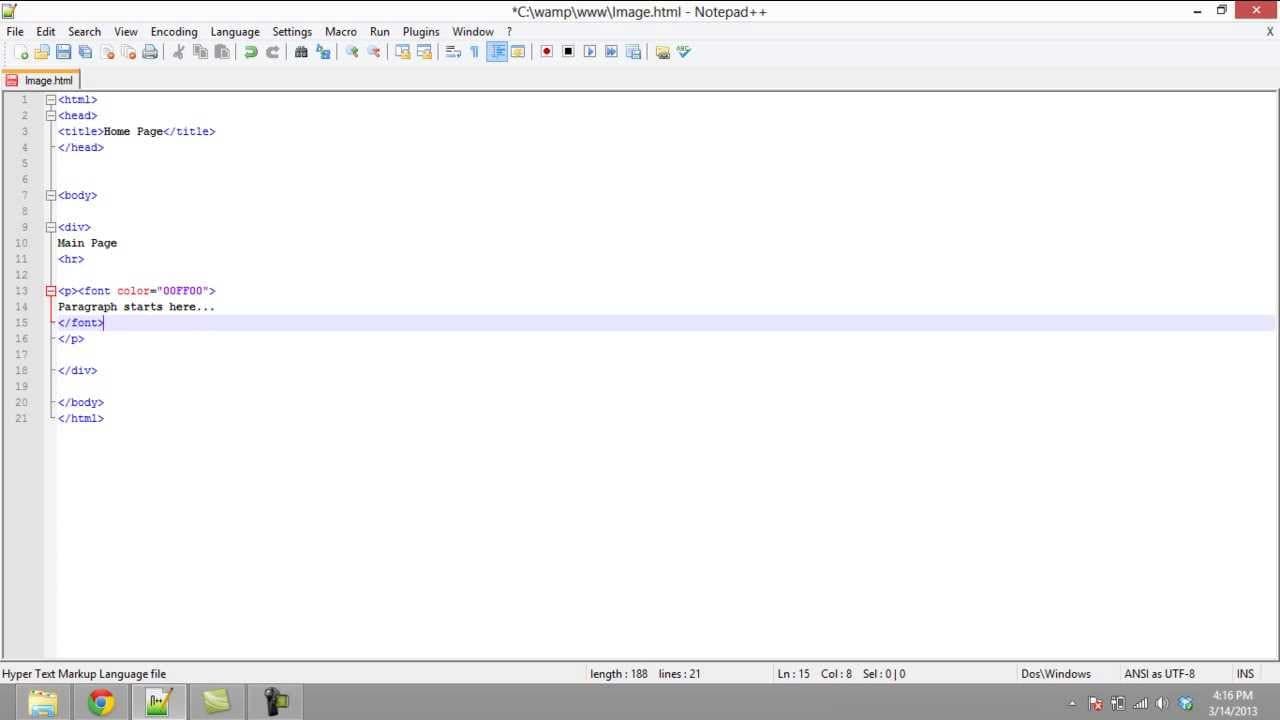
The Best Online Bookstore: https://amzn.to/4hlEMZp This tutorial will teach you the ways of changing text color in HTML. There are two basic ways of changing text in HTML. Don't forget to check out our site http://howtech.tv/ for more free how-to videos! http://youtube.com/ithowtovids - our feed http://www.facebook.com/howtechtv - join us on facebook https://plus.google.com/103440382717658277879 - our group in Google+ In this tutorial we will teach you the ways of changing text color in HTML. Changing color of the text in HTML can be done in many ways. One way is to set s universal color for the whole text and the other way is to use a color for a specific attribute. Overall, there are 16 million colors of HTML with their 6-digit hex codes which are easily available on the internet. Step 1: Set Universal Color of the Text in HTML In html, to change text color you can set the universal color. Setting universal color means to set a color for all attributes of text like heading, paragraph etc in the body element. To set the color, you can use any of the 6-digit code for the color value or simply write the name of the color, for example orange or any other, along with the text. This will change all the text on a web page to orange. Similarly, by setting the text attribute to blue, the text color of the web page changes to blue.. Step 2: Change Text color of a paragraph in HTML If we don't want to change the color of the complete text on the webpage, we can use the "font" element for changing text color in html. We have to first set the color value inside the font element. The color value can be set by any of the 6-digit Hex code or writing only the color name. The text has to be placed within the font element. Over here, let's set the color to green and once your refresh the page, you can see that html changes the text color. Step 3: Change Line's Text color in HTML In order to change the color of a single line, we enclose the text within the text color attribute and set the color to the desired color. This change is specific to a piece of text and overrules any text color set at the universal level or to the paragraph containing the line.
About YouTube Real-Time View Count
With SocialCounts.org’s view counter, track your YouTube video’s live view count and YouTube likes count in real time with fast, reliable updates.
Watch every YouTube video live view count rise with our real-time YouTube views tracker—built for accuracy and minimal delay.
Follow YouTube real time views as they happen, using our dedicated view counter for YouTube videos.
Get up-to-date live view count on YouTube and see real-time growth with SocialCounts.org’s smart tracking tools.
Embed Widget
Parameters:
fullscreen=true- Fullscreen countergraph=true- Live graph chartcounter=0/1/2- Select counter (0=likes, 1=views, 2=comments)
URL
Click to copy the embed URL to your clipboard