


2,003
likes
0
comments
daily view 0
monthly view 0
Live Analytics
Comments 0
NTSB Animation - Aircraft Visibility Study - DCA Midair Collision Analytics Table
Income Estimates for NTSB Animation - Aircraft Visibility Study - DCA Midair Collision
Based on this YouTube video's total view count of 146K views and industry-standard rates, the estimated total earning is $103 - $293 through ad revenue. Historical data is not yet available to calculate daily, weekly, or monthly averages.
About NTSB Animation - Aircraft Visibility Study - DCA Midair Collision
Explore NTSB Animation - Aircraft Visibility Study - DCA Midair Collision with 146,501 views, 2,003 likes, and 0 comments. Experience the impact of this video content that has captured audience attention.
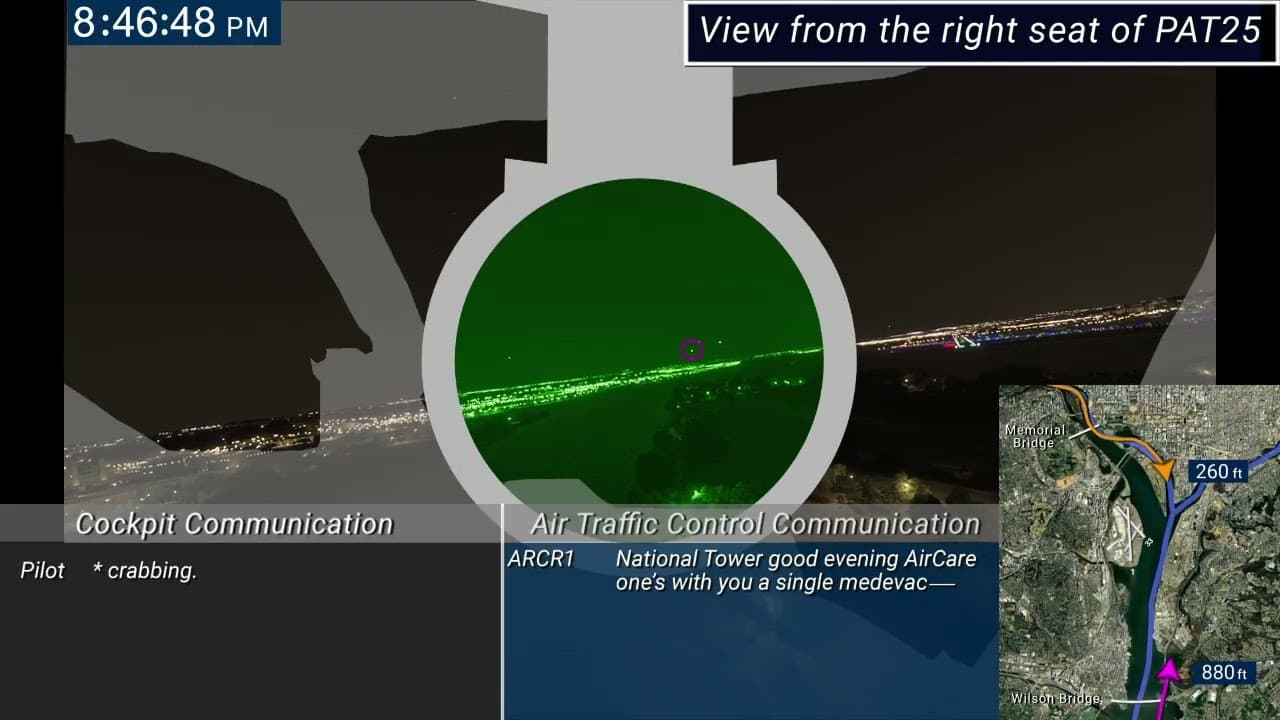
View from the right seat of PAT25 The first animation presents a simulated nighttime view from the right seat of helicopter PAT25. The nighttime imagery was generated using Microsoft Flight Simulator 2024, and some landmarks are unrealistically bright. The CRJ700 model for Microsoft Flight Simulator 2024 did not have functional external lighting, so a model of a Boeing 737 was used instead. Although night vision goggles are binocular, the brain merges the image into a single circular view, so the view through the night vision goggles is shown as a single circle. The night vision goggles are shown as stationary, and the pilot’s head position does not move or scan. The imagery does not include additional light sources that night vision goggles would typically display more brightly, such as stars. A dark gray structural mask, generated from a three-dimensional laser scan of an exemplar aircraft, overlays the nighttime view. The mask includes labels identifying the center windshield on the left side of the screen and the right windshield on the right side of the screen. Then a light gray mask depicting the night vision goggle mounting structure is overlaid on the structure of the helicopter. A circular field within the mounting structure includes a green-tinted overlay to represent the fixed, forward-looking view of the instructor pilot through the night vision goggles. The screen is then divided into upper and lower sections. The upper portion displays the forward nighttime view from the right seat of PAT25. Intra-cockpit communications transcribed from the cockpit voice recorder are shown as on-screen text at lower left. (Audio from the cockpit voice recorder is protected by law; only a transcript can be shared.) Air traffic control communications on the helicopter frequency are shown as on-screen text in the lower center area of the screen. Air traffic control transmissions from the local controller and other helicopters that were blocked by radio interference are indicated by striking through text in the transcript. A magnified satellite photograph is briefly displayed, highlighting the flightpath of PAT25 with an orange arrowhead and trail, and the flightpath of flight 5342 with a magenta arrowhead and trail. This image then transitions to a moving map located in the lower right corner of the screen, which tracks the positions of PAT25 and flight 5342 in concert with the view from the cockpit. The animation then plays in real time and depicts the final three minutes prior to the collisionwith a clock shown at upper left. Audio of air traffic control communication on the helicopter frequency is synchronized with the view from the cockpit. About 8:46:15, a magenta circle with a label “Flight 5342” appears just above the horizon on the right side of the upper portion of the screen. The label “Flight 5342” fades out about 8:46:35. The magenta circle tracks the lights of flight 5342 and remains visible until the airplane becomes visually recognizable in the center windshield on the left of the screen about 8:47:44. The view fades to black as the aircraft collide. View from the right seat of flight 5432 The second animation presents a simulated nighttime view from the right seat of flight 5342. The nighttime imagery was generated using Microsoft Flight Simulator 2024, and some landmarks are unrealistically bright. A dark gray structural mask, generated from a three-dimensional laser scan of an exemplar aircraft, overlays the nighttime view. The mask includes labels identifying the left windshield and the right windshield. The screen is then divided into upper and lower sections. The upper portion displays the forward nighttime view from the right seat. Intra-cockpit communications transcribed from the cockpit voice recorder are shown as on-screen text at lower left. (Audio from the cockpit voice recorder is protected by law; only a transcript can be shared.) Air traffic control communications on the airplane frequency are shown as on-screen text at lower right. A moving map is displayed in the upper left corner of the screen, with PAT25 indicated by an orange arrowhead and trail and flight 5342 indicated by a magenta arrowhead and trail. The map tracks the positions of PAT25 and flight 5342 in concert with the view from the cockpit. The animation then plays in real time and depicts the final three minutes prior to the collisionwith a clock shown at upper center. Audio of air traffic control communication on the airplane frequency is synchronized with the view from the cockpit. About 8:47:14, an orange circle with a label “PAT25” appears in the center of the upper portion of the screen to indicate the location of PAT25. The orange circle and the label remain visible until the helicopter becomes visually recognizable about 8:47:57. The view fades to black as the aircraft collide.
About YouTube Real-Time View Count
With SocialCounts.org’s view counter, track your YouTube video’s live view count and YouTube likes count in real time with fast, reliable updates.
Watch every YouTube video live view count rise with our real-time YouTube views tracker—built for accuracy and minimal delay.
Follow YouTube real time views as they happen, using our dedicated view counter for YouTube videos.
Get up-to-date live view count on YouTube and see real-time growth with SocialCounts.org’s smart tracking tools.
Embed Widget
Parameters:
fullscreen=true- Fullscreen countergraph=true- Live graph chartcounter=0/1/2- Select counter (0=likes, 1=views, 2=comments)
URL
Click to copy the embed URL to your clipboard